Most businesses treat their email list like a trophy. The bigger the number, the better the bragging rights. But here’s the thing: a big list full of people who never open your emails isn’t an asset. It’s a liability.
Sending an unsubscribe email feels counterintuitive. You worked hard to get those subscribers. Why would you invite them to leave? Because the ones who aren’t opening, clicking, or buying are costing you money and dragging down the performance of every email you send to the people who actually care.
The average email marketing ROI sits at about $36 to $42 for every $1 spent. That’s incredible. But that number only works when your list is healthy. When you’re paying your email service provider to send messages to people who delete them without reading, you’re spending money to talk to a wall.
Why Would You Willingly Shrink Your Email List?
Because a smaller, engaged list outperforms a bloated, inactive one every single time. I’ve seen this across every industry I’ve worked in over the past 13 years. The businesses that obsess over list size tend to have worse deliverability, lower open rates, and more spam complaints than the ones who regularly clean house.
There are three big reasons why sending an unsubscribe email to disengaged subscribers is one of the smartest moves you can make.
How Does a Disengaged List Hurt Your Email Performance?
Every email you send gets tracked by inbox providers like Gmail, Yahoo, and Outlook. They look at how many people open your emails, how many click, and critically, how many ignore them entirely. When a large chunk of your list never opens anything, those providers start thinking your emails aren’t worth delivering.
This is where the math gets brutal. Gmail now uses engagement quality as a primary ranking signal. Low open rates and low reply rates reduce your inbox placement over time. That means your emails to the subscribers who actually want to hear from you start landing in the promotions tab or worse, the spam folder, because your disengaged subscribers are dragging your sender reputation down.
Sending an unsubscribe email to inactive subscribers cleans up that signal. Once the people who never open are off your list, your open rates go up, your click rates go up, and inbox providers start treating your emails like they belong in the primary inbox again.
How Does Removing Subscribers Make Room for Growth?
Most email platforms charge you based on the number of subscribers on your list. Mailchimp, Klaviyo, ActiveCampaign, ConvertKit, all of them. If you’re sitting on 10,000 subscribers and 3,000 of them haven’t opened an email in six months, you’re paying for dead weight.
That money could go toward acquiring new, engaged subscribers instead. Running a lead magnet campaign, improving your signup forms, or investing in content that attracts the right people. Every dollar spent maintaining inactive contacts is a dollar not spent growing your list with people who will actually convert.
Email lists naturally decay at a rate of about 20% to 25% per year according to multiple industry studies. People change jobs, switch email addresses, or simply lose interest. That’s normal. The problem is when you hold onto those contacts long past the point where they stopped caring. Sending an unsubscribe email lets you refresh your list and redirect your budget toward people who will actually engage.
How Does an Unsubscribe Email Prevent Spam Complaints?
This one surprises people, but it’s arguably the most important reason to send unsubscribe emails proactively. When someone on your list gets tired of your emails but can’t easily unsubscribe, or doesn’t bother to look for the unsubscribe link, they do something much worse. They hit the spam button.
And spam complaints are devastating. Gmail and Yahoo require bulk senders to maintain a spam complaint rate below 0.1%, with an absolute ceiling of 0.3%. That means out of every 1,000 emails you send, you can only afford one spam complaint before you’re in the danger zone. Hit 0.3% consistently and your emails start getting blocked entirely.
To put that in perspective, if you send to 10,000 people and 30 of them mark you as spam, you’re already at the threshold. By giving disengaged subscribers a clear, easy way to leave through an unsubscribe email, you’re preventing them from taking the nuclear option of reporting you as spam. You’re controlling the exit so it doesn’t damage your reputation.
Gmail also now requires one click unsubscribe functionality for all bulk senders using a specific header format. This isn’t optional anymore. The major inbox providers have made it clear that they want subscribers to have easy, frictionless ways to opt out. If you make it hard to unsubscribe, they’ll penalize you for it.
What Does a Good Unsubscribe Email Look Like?
Not all unsubscribe emails are created equal. The best ones give the subscriber a genuine choice, respect their time, and sometimes even win them back. Here are 10 approaches that actually work.
1 The Honest Breakup
Be upfront about it. Subject line: “We noticed you haven’t been opening our emails.” The body explains that you don’t want to clutter their inbox, and gives them two clear buttons: “Keep me subscribed” or “Unsubscribe.” No guilt trips, no drama. Bonobos does a version of this with minimal copy and a single call to action. Simple and respectful.
2 The Preference Update
Instead of asking them to leave entirely, offer a chance to change what they receive. “Maybe we’re sending too much, or the wrong stuff.” Link to a preference center where they can choose email frequency or content topics. Zapier and Marriott use this approach effectively, and it often saves subscribers who would have otherwise left.
3 The Countdown Timer
Give them a clear deadline. “We’ll remove you from our list in 7 days unless you click this link.” This creates urgency without being aggressive. BuzzFeed uses this method by telling inactive subscribers they’ll be automatically unsubscribed if they don’t click to confirm. It works because people pay more attention to what they might lose.
4 The “Here’s What You Missed” Recap
Remind them why they signed up by highlighting your best recent content. “In case you missed it, here are our three most popular posts this month.” This reengages people who drifted away not because they lost interest but because life got busy. Adalo does something similar by showcasing what other users have accomplished since the subscriber last engaged.
5 The Humor Approach
Use a lighthearted tone to stand out in the inbox. Subject lines like “Were You Eaten By a T Rex?” (Famebit actually used this one) or “Was it something we said?” from Revolve grab attention because they break the pattern of every other marketing email. When you make someone smile, they’re more likely to stick around.
6 The Incentive Offer
Offer something valuable in exchange for staying. A discount, a free resource, or early access to something new. Pottery Barn uses “We’ve Missed You! Here’s 15% Off Everything” as a reengagement subject line. It works because it gives the subscriber a concrete reason to come back right now. Just don’t rely on discounts alone or you’ll train people to disengage for deals.
7 The Feedback Request
Ask them why they stopped engaging. A short one question survey or even just a reply to the email. “We’d love to know what we could do better.” CloudApp does this well by starting a conversation with inactive users and offering a free month of their pro plan as a thank you for the feedback. You get valuable insights either way.
8 The Social Proof Nudge
Show them what the engaged subscribers are getting. “Last month, our readers used our tips to increase their traffic by an average of 23%.” Skillshare uses real testimonials from active users to remind inactive subscribers of the value they’re missing. Social proof is powerful because it shifts the question from “Do I care?” to “Am I missing out?”
9 The Product Update Email
If your product or service has improved since they last engaged, tell them about it. “Things have changed since we last connected. Here’s what’s new.” Clear, the identity verification company, does a good job of highlighting improvements to their service as a reason to take another look. People who left because of a shortcoming might come back when it’s fixed.
10 The Graceful Goodbye
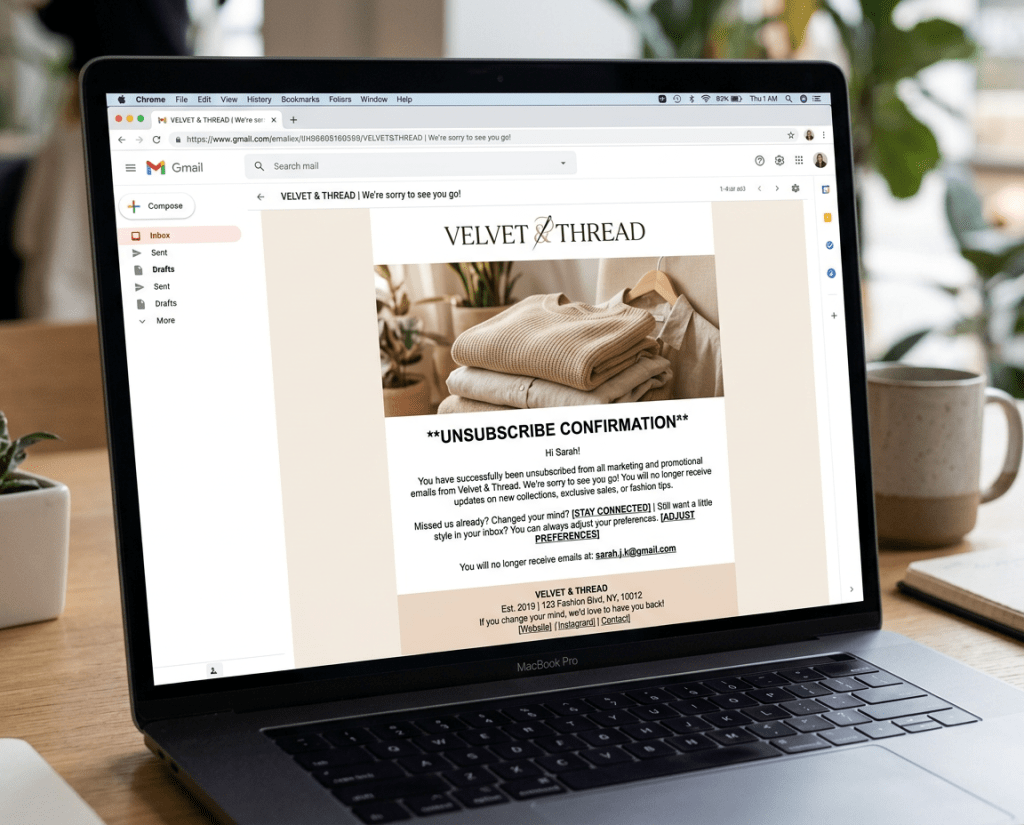
Send a final email after your reengagement sequence confirming you’ve removed them, with one last chance to opt back in. “We’ve taken you off our list. If you ever want to come back, just click here.” MailerLite uses this as the last step in their automation. It’s respectful, it’s clean, and it leaves the door open without being pushy. This is the unsubscribe email at its best.
So Is It Really Worth Letting Subscribers Go?
Absolutely. Unsubscribing people from your email list is healthy. It improves your deliverability, lowers your costs, protects your sender reputation, and ensures that the people who stay on your list are the ones who actually want to hear from you. A list of 5,000 engaged subscribers will outperform a list of 20,000 disengaged ones every single time. Start with one step: identify your subscribers who haven’t opened an email in 90 days, send them a simple reengagement message, and let the ones who don’t respond go. Your email performance, your budget, and your remaining subscribers will all be better for it.